
Enterprise legal practice management

Run every branch as one practice

Bring branches, teams, data and private client workflows into one connected platform, with the control, visibility and flexibility a complex practice needs.

  • Read and write across every section, including specialist drafting Apps, through the API
  • Keep branch data separated with permission-gated firm-wide oversight
  • Build dashboards and scheduled reports around the KPIs your organisation tracks

For larger and multi-branch private client practices.

API-first

Read and write across every section

Multi-branch

Local separation, central oversight

Multi-tenant

Database separation

Certified

ISO/IEC 27001 and Cyber Essentials

Multi-branch governance

Scale across branches without losing oversight

Run multiple offices or sub-brands within the same account, with the branch structure configured alongside our team during implementation. Data remains segmented between branches, while permission-gated consolidated views let the relevant users move from an individual branch to the complete practice - one click, anywhere in the platform.

  • Keep branch-level matters and operational data separated
  • Give authorised users a consolidated view across matters, tasks and reports
  • Support offices and sub-brands without creating disconnected systems
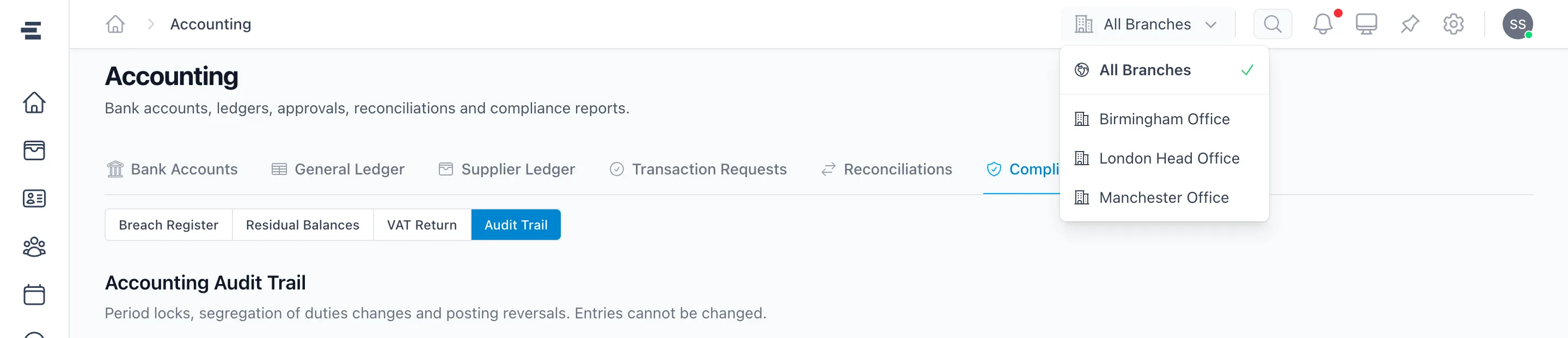
The Superlawyer branch switcher open in the header, moving between All Branches, Birmingham, London and Manchester offices
The branch switcher, available on every screen - from one office to the whole practice

Teams & permissions

Organise access and work around real teams

Group users into teams, then use those teams when assigning tasks, routing emails and applying permissions. People see and act on the work relevant to their role, branch and responsibilities - with more than 100 configurable permissions behind every role.

  • Assign tasks to the user or team responsible
  • Route email to the right group
  • Control access by role, branch and responsibility

Implementation & service

A rollout model tailored to the organisation

Enterprise pricing includes the implementation and ongoing service a larger deployment needs - including migration planned around your firm, with the option of a weekend cutover to minimise disruption.

  • Dedicated account manager for rollout and ongoing service
  • Tailored implementation, training and custom integrations
  • Weekend cutover option for migration, agreed in advance
  • Service-level agreement settled before implementation

Dashboards & reporting

See what is happening, understand why and act next

Turn any pre-built or custom report into a dashboard widget, alongside notice boards that share updates with the whole practice or selected teams. Leaders see the complete picture; each branch and user keeps a focused view of their own work.

  • Dashboard widgets built from pre-built or custom reports
  • Notice boards for firm-wide or team-targeted updates
  • Kanban task views across the practice, a team or one user

Advanced reporting

Report on the detail other systems leave inside documents

Create and save reports across nearly every data point in Superlawyer, including answers captured through drafting App questionnaires - for example, every matter where a particular Will App question has a specified answer.

  • Combine matter, financial, task and questionnaire data in one report
  • Save custom reports for repeatable analysis
  • Schedule reports to generate automatically and email selected users

Controls & security

Put governance into the work, not around it

Separate responsibilities clearly, keep an auditable route through financial work and give security reviewers evidence they can assess.

Segregation of duties

One controlled route through financial work

Configure roles so one user submits a ledger entry request while a different user reviews and approves it - approvers must differ from requesters. Every lock, reversal and settings change lands on a permanent audit trail.

  1. Request

    A permitted user submits the entry

  2. Review

    The detail remains visible and auditable

  3. Approve

    A different, authorised user completes it

See the legal accounting controls

Security assurance

Evidence enterprise reviewers can assess

Superlawyer is independently certified, hosted in the UK, and integrates with your identity provider - with granular permissions inside the platform.

ISO/IEC 27001 certified
Cyber Essentials certified
UK data residency
Microsoft Entra single sign-on
Review the Trust Centre

API access

Designed API-first, from every page to the drafting Apps

The Superlawyer API provides read-and-write access across every section of the platform. Matters, documents, reports and the specialist drafting Apps can connect to the systems and workflows your organisation already uses.

  • Read and write matters, documents, reports and drafting Apps
  • Connect existing systems without re-keying data
  • Scope custom integrations with our team, or build your own in house

Infrastructure

A data architecture scoped for your practice

Superlawyer runs on AWS infrastructure with UK data residency. The tenant architecture can be configured so an Enterprise practice uses a database dedicated to that organisation, supporting stronger data separation.

  • AWS infrastructure with UK data residency
  • Dedicated database option for stronger separation
  • Isolation model agreed during technical scoping

Custom drafting automation

Your templates, clauses and intake forms - for any practice area

The specialist drafting Apps ship for Wills, LPAs and Probate - and the same engine can be configured for any practice area your firm runs. Bring your own templates and clause libraries, build guided intake questionnaires, and link answers to clauses so every team drafts to your standards.

You will not be doing this alone: our team implements your precedents and custom work with you, with training available so your firm can manage and evolve the setup in house.

See the standard drafting Apps
  1. Your templates and clause library

    Start with the structure and approved wording your practice already uses - in any practice area.

  2. Guided intake forms

    Build questionnaires that capture the parties, facts and decisions your documents need.

  3. Systematic drafting

    Link answers to clauses so the guided workflow applies your standards consistently, matter after matter.

Frequently asked questions

The practical details

Clear answers to the questions private-client practices commonly ask before taking the next step.

Does Superlawyer support multi-branch legal practices?

Yes. Multiple offices or sub-brands can operate under one umbrella account. Branch data remains separated, while authorised users can be given a consolidated view across matters, tasks and reports.

What can the Superlawyer API read and write?

Superlawyer was designed API-first. The API supports read and write access across the platform, including its specialist drafting Apps, so practices can connect matters, data and workflows with their wider technology environment.

Can we create custom dashboards and schedule reports?

Yes. Dashboards can combine widgets based on pre-built or custom reports with notice boards for internal updates. Reports can be saved, scheduled, generated automatically and emailed to selected users.

Can Superlawyer separate duties within legal accounting?

Yes. Roles, permissions and approval processes can separate who requests a transaction from who reviews and approves it, helping practices maintain clear financial controls between teams.

How does an Enterprise migration work?

Enterprise migrations are planned thoroughly with your firm. We work with your IT team and outgoing provider to scope the data, agree the mapping and validation approach, and rehearse the cutover before it happens - with a weekend go-live option to minimise disruption. Responsibilities and timing are agreed in advance.

Can we automate our own practice areas, templates and clauses?

Yes. Beyond the standard Will, LPA and Probate Apps, Enterprise practices can configure their own templates and clause libraries and build guided intake questionnaires for any practice area - linking answers to clauses so drafting keeps the practice's preferred wording. Our team implements your precedents with you, and training is available so the firm can manage them in house.

Can Superlawyer provide a dedicated database?

A dedicated database option is available for Enterprise practices with additional data-separation requirements. The exact tenant and database architecture is agreed during technical scoping.

A demonstration built around your operating model

See how Superlawyer would fit your organisation

Bring your branch structure, reporting requirements, integration needs and drafting model to a tailored Enterprise demonstration.