Matter management software

Run every matter from one connected record

Superlawyer keeps the people, documents, correspondence, tasks, appointments and billing for each matter in one place - with visual workflows that automate the routine and keep the next step clear.

  • People, documents, correspondence and billing in one matter view
  • Automate emails, SMS messages and tasks from workflow stages
  • Emails and appointments kept in sync through Microsoft 365
  • Automation that follows your judgement, not the other way round

One record

The current stage and next action visible to anyone with access

Automated follow-up

Emails, SMS, tasks and updates sent as the matter moves forward

Microsoft 365

Client emails and appointments filed to the matter automatically

How it works in practice

The whole matter in view, the routine handled for you

One connected record

Open the matter and see the whole picture

Every matter keeps its people, documents, correspondence, tasks, appointments and financial activity together. Through the Microsoft 365 integration, email exchanged with the client is filed to the matter automatically and appointments appear on both the Superlawyer and Outlook calendars.

That clear history supports handovers and supervision - anyone with access can see what has happened and what should happen next.

  • Parties, documents, correspondence and activity in one view
  • Client emails filed to the matter automatically
  • Drafting Apps and risk assessment on the matter overview
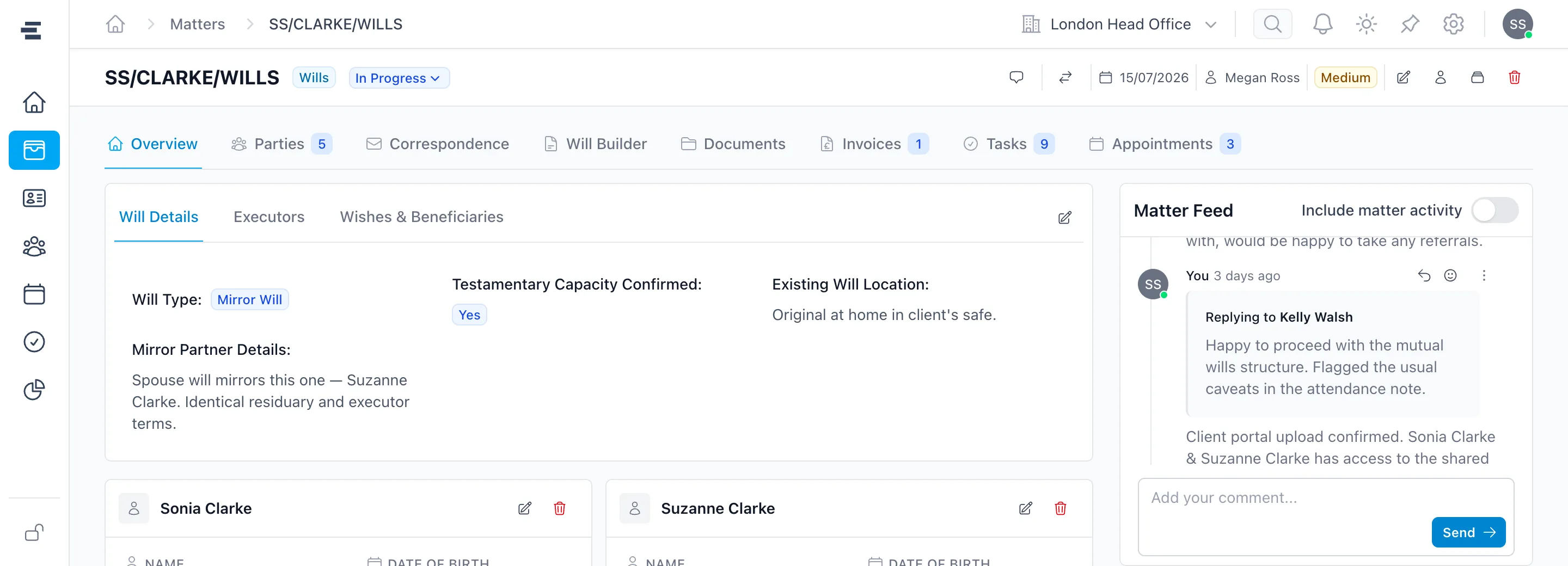
A Superlawyer Will matter showing its tabs for parties, correspondence, documents, invoices, tasks and appointments, the Will details and the Matter Feed
A real Will matter - every part of the work one tab away, with the team conversation alongside

Last Will & Testament - Review Process

Stage: Drafts Sent to Client

3 automated actions
  • Send Email

    Your draft Will is ready to review

    To the client, with the draft attached

    On entering the stage
  • Send Email

    A gentle reminder about your draft

    To the client, if the stage has not moved on

    Three days later
  • Create Task

    Chase client response

    Assigned to the fee earner

    On entering the stage
Configured once on the workflow - carried out on every matter that reaches this stage.
One stage from the Will review workflow below, up close

Stage-based automation

Let the workflow carry out the follow-up

Give each stage of the workflow its own actions, so routine work happens on its own as the matter progresses - and nothing depends on someone remembering to send the follow-up.

  • Internal and client emails or SMS messages sent for you
  • Tasks created individually or from reusable templates
  • CRM fields, matter statuses and workflow steps updated automatically

Branching routes

Branch where real matters branch

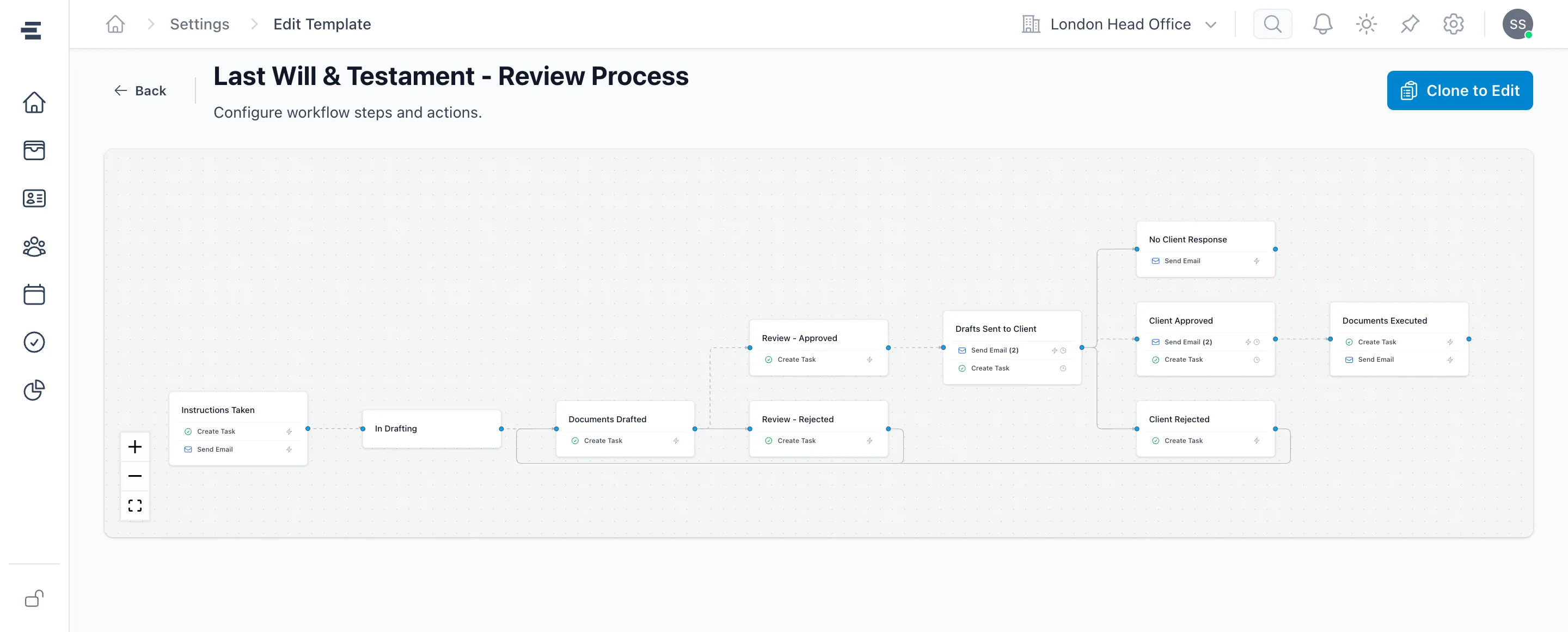
Few matters follow one straight line. Build workflows with branching points where your team chooses the appropriate next step - approved, amendments requested, no response - so the process stays consistent with room for professional judgement.

  • Branches for the different ways a matter can progress
  • The chosen route recorded in the matter history
  • Pre-built journeys for Wills, Probate and LPA work, fully customisable
The Superlawyer workflow template builder showing a Will review process branching into client approved, amendments and no-response routes
A real Will review workflow - every stage carries its own actions, and the process branches where the matter can

Real-time collaboration

Talk about the matter, on the matter

Every matter carries its own feed, where the team can raise questions, answer each other and see at a glance who is online. The conversation stays on the matter record, so decisions and context are there for whoever picks the file up next.

  • Questions, answers and decisions kept on the matter record
  • See at a glance who is online and available
  • Switch on matter activity to see the complete history

Matter Feed · TL/SAMUELSON/WILLS

Include matter activity
  • Julia Smith · Today, 10:04

    Draft has gone to Jack this morning - I flagged the mirror-Will caveats in the attendance note.

  • Filippo Grillo · Today, 11:26

    Replying to Julia Smith · "Draft has gone to Jack this morning..."

    Thanks - do we have the signed engagement letter back yet?

  • Julia Smith · Today, 11:31

    Yes - filed under Documents. I'll chase Jack's comments on Thursday if nothing lands.

The team conversation, held on the matter itself

From instruction to outcome

A clear route through every matter

The workflow handles the routine while your team decides the route.

  1. Create the matter

    Start from the client record, with people and details already connected.

  2. Apply a workflow

    Choose a pre-built Wills, Probate or LPA journey, or one your firm has designed.

  3. Let stages run the routine

    Emails, SMS messages, tasks and updates trigger automatically as the matter moves forward.

  4. Choose the route

    Where the matter can progress in different ways, pick the appropriate next step with the history in view.

Frequently asked questions

The practical details

Clear answers to the questions private-client practices commonly ask before taking the next step.

What actions can a workflow automate?

Workflow stages can trigger internal or client emails, SMS messages, individual tasks or task templates, CRM field and matter-status updates, movement into another workflow step, matter creation or closure, and more.

Can a workflow have different paths?

Yes. Workflows can be multidirectional. When a matter reaches a branching point, users choose the appropriate next step - for example, progressing to client approved, client rejected or no client response.

What can someone see when they open a matter?

The matter brings its workflow stage, people, documents, correspondence, tasks, appointments and activity together, so anyone with access can quickly understand what has happened and what should happen next.

See it in a real matter

Build the workflow around the way your firm works

See how automated actions, branching routes and one connected matter record can reduce manual follow-up while keeping every next step clear.